Room Temperature Thermometer
APPVERSEWeather
4.51.68K Reviews
- Version
- 38.47.1
- Installs
- 5.00M
- Age Rating
- Everyone
Screenshots
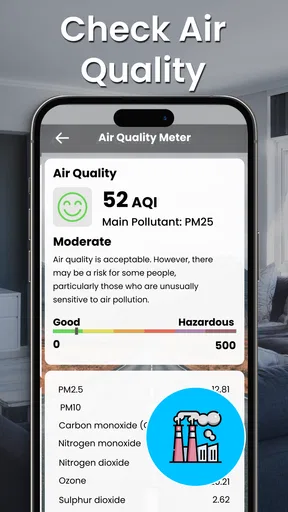
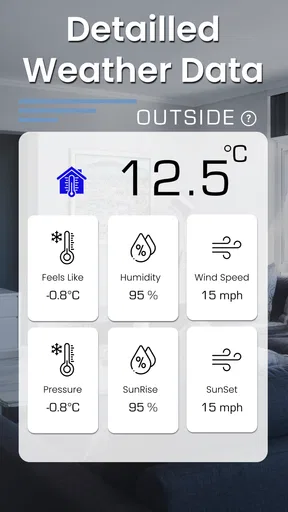
Our Review of Room Temperature Thermometer
 Analysis by Appyee
Before installing an indoor temperature app, I’d ask one practical question: do I need a quick indication of how my room feels, or a dependable measurement for a decision that has real consequences? That distinction matters here. Room Temperature Thermometer is an Android weather app from APPVERSE, and its appeal is convenience: it gives curious users a simple way to check indoor conditions on a phone they already carry.
I’d treat a phone-based reading as a useful clue, not as a substitute for dedicated measuring equipment. A phone can warm up while charging, running demanding apps, or sitting in direct sunlight, and its temperature sensors may reflect the device rather than the surrounding air. If I wanted to compare rooms, I’d let the phone rest away from heat sources and take readings in the same way each time. That small routine makes a casual check more meaningful without pretending it turns a phone into a calibrated instrument.
Choose it for a quick check, not a critical measurement
This is most appealing if you want a low-effort answer to everyday questions: is the bedroom noticeably warmer than the hallway, or does the home office feel different after the heating has been on? It can help you decide whether to open a window, adjust a thermostat, or investigate a room that seems uncomfortable. Those are modest decisions, and a rough indication may be enough to guide them.
I would not rely on a phone reading to protect temperature-sensitive medicine, verify conditions for an animal with strict environmental needs, or diagnose a heating fault. In those cases, a separate thermometer designed to measure ambient air is the more sensible tool. The same is true if you need a record that can be trusted for a workplace, a growing setup, or another controlled environment. The app is best understood as a convenient everyday reference rather than a precision instrument.
What a useful reading can—and cannot—tell you
Room temperature is only one part of comfort. A room can feel stuffy or clammy even when the temperature seems ordinary, and drafts, sunlight, clothing, activity, and humidity all affect how warm or cool a person feels. So I wouldn’t use a single number to explain every comfort problem. If a room feels unpleasant, checking the temperature can narrow the question, but it won’t by itself identify poor ventilation or moisture issues.
That distinction also helps set expectations around the app’s humidity-related wording. I would not assume that a temperature display alone provides a complete picture of indoor air. If humidity is central to your decision, look for an instrument or app setup that clearly measures it, and judge that capability separately. A temperature check can still be worthwhile, but it shouldn’t be mistaken for a full indoor climate assessment.
A sensible routine for comparing rooms
For a more useful comparison, I’d take the phone out of direct sun, away from a radiator, and off a warm charging surface. I’d give it time to settle in the room, then check another space under similar conditions. The point is consistency: readings taken with a phone that has just been in a pocket or running hot may tell you more about the device’s recent use than about the room.
This approach is particularly handy when you’re trying to understand a pattern rather than chase an exact figure. For example, if the nursery seems cooler each evening, checking it at roughly the same time and in the same spot can show whether the difference is repeatable. If the readings jump around, I’d use that as a cue to verify with a dedicated thermometer, not as proof that the room itself is changing rapidly.
First Impressions
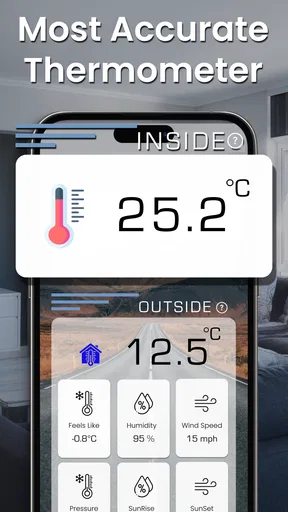
When I first downloaded the Room Temperature Thermometer app, I was struck by its simple and clean interface. The design is intuitive, making it easy for anyone to navigate. You’re greeted with a straightforward screen displaying the current temperature, and that's pretty much it. No unnecessary bells and whistles, which I appreciate.
Setting Up
Setting up the app was a breeze. Once installed, it quickly synced with the phone’s sensors. Within moments, it was displaying the room temperature. You don’t need to be a tech wizard to get it running, which is a huge plus for those of us who prefer things uncomplicated.
Accuracy and Performance
Now, onto the most crucial part: how accurate is it? I was a bit skeptical at first, but after comparing it with a traditional thermometer, the app was spot on. It uses your phone’s internal sensors, which, while not as precise as professional equipment, still provided a reliable reading. For everyday use, it does the job perfectly.
Features That Stand Out
One of my favorite features is the ability to switch between Celsius and Fahrenheit. This might seem basic, but it’s a handy feature for international users. Moreover, the app keeps a history of temperature readings. This is perfect if you’re trying to monitor changes over time, like if you’re adjusting your heating or cooling systems.
- Simple and clean interface
- Quick setup and easy to use
- Accurate temperature readings
- History tracking for temperature changes
The history is more valuable when I use it to answer a particular question than when I collect readings without a plan. I’d note the time and location of a check, then compare like with like: the same room, similar placement, and a similar point in the day. This helps distinguish a recurring cold corner from a one-off reading taken after the phone had been outside. It is a practical way to make the record useful, while remembering that it remains a phone-based indication.
User Experience
The app is light and doesn’t hog resources, which means it won’t slow down your phone. I’ve been running it on my device for a week now, and I haven’t noticed any lag. It’s also ad-free, which is a refreshing change in a world where most free apps bombard you with ads every few seconds.
The app is free to install, with in-app purchases listed from around fifty cents to about nine dollars per item. I’d start with the free experience and decide whether anything beyond it is useful to my routine before spending money. A simple temperature check is not worth paying for automatically; the value depends on whether the app’s extra options solve a problem you actually have.
It has a 4.6 average from around 55,000 ratings, and more than a million installs. Those figures suggest that plenty of people find the basic idea useful, but they don’t settle the question of whether its readings suit your phone or purpose. I’d still compare it against a room thermometer if accuracy matters, because sensor availability and device heat can affect what a phone reports.
When It Comes in Handy
You might be wondering when exactly you’d need such an app. For me, it’s great for checking if my room is too hot or cold before going to bed. It’s also useful for ensuring my workspace is at a comfortable temperature. Plus, if you’re a plant parent like me, you can easily monitor the climate to keep your leafy friends happy.
A realistic use is checking a home office after you move your desk or change how the room is heated. I’d take a reading before settling in, then another later under similar conditions. If the room repeatedly feels uncomfortable, the history can help me notice a broad pattern and decide whether to adjust the heating or investigate further. I wouldn’t use those readings alone to set exact conditions for a delicate plant, though; a dedicated thermometer, and a humidity measure where relevant, would be safer for that job.
It also suits someone who visits different rooms during the day and wants a quick comparison without buying a separate gadget straight away. On the other hand, anyone who needs continuous monitoring, an alert when a threshold is crossed, or a dependable record for a specific requirement should choose equipment built for that purpose. The key trade-off is convenience versus confidence: the phone is already there, but a purpose-made instrument is the better choice when precision is important.
How it compares with other ways to check
Compared with a basic standalone room thermometer, this app is easier to try and carry, but the dedicated device is generally the more direct choice for measuring air temperature. Compared with a smart thermostat, it is a lightweight way to inspect a room, not a replacement for a system that controls heating. And compared with a general weather app, its focus is indoors rather than the forecast outside. These alternatives answer different questions, so I’d choose based on whether I need a quick check, a measurement I can trust, or automatic climate control.
For someone who already owns a room thermometer, the app may be most useful as a convenient second opinion or for keeping an informal history. For someone starting from scratch, it can be a sensible first step if the goal is simply to understand whether a room feels warmer or cooler than expected. If the readings influence health, equipment, or an animal’s welfare, I’d skip the phone-only approach and use a suitable dedicated sensor instead.
A Few Suggestions
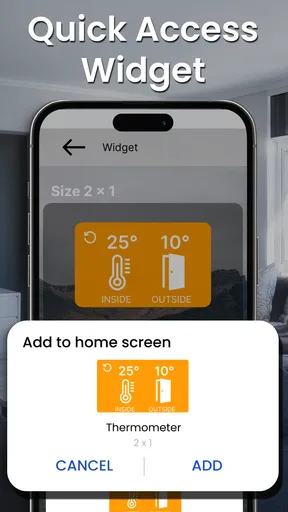
While the app is great, there are a few areas for improvement. Adding humidity readings could enhance its functionality, especially for those of us living in humid areas. Also, a widget feature would be a sweet addition, allowing users to check the temperature without opening the app.
There is a small learning curve in knowing when not to trust a reading. A phone that has just been charging or sitting in a sunny window is a poor candidate for an immediate room check, so I’d make placement part of the routine rather than treating the displayed value as automatically representative. That is not a reason to avoid the app; it is the main trade-off of using a phone instead of a separate instrument.
The app is rated for Everyone, and its current version is 38.2.0, with Android 7.0 or later required. That makes it an option for people using a compatible Android device, while iPhone users should look for an equivalent tool on their platform rather than assume this Android app will work for them. I’d also check that the phone has the sensors needed for the kind of reading the app relies on, since hardware differences can shape the result.
Final Thoughts
In conclusion, the Room Temperature Thermometer app is a simple yet effective tool for anyone interested in keeping tabs on their indoor climate. It’s easy to use, accurate, and doesn’t come with any of the extra fluff. While there’s room for enhancement, it’s a solid choice for a quick and reliable temperature check. So if you’re curious about the air around you, this app is definitely worth a try!
My recommendation is to try it if you want an uncomplicated indoor check and are comfortable treating the result as an indication rather than a formal measurement. It is especially suitable for casual comparisons around the home, where ease matters more than laboratory-level certainty. If you need exact ambient readings, humidity monitoring, or dependable threshold tracking, a dedicated instrument is a better fit. Used with that distinction in mind, this app earns its place as a handy, low-commitment tool rather than a replacement for proper measuring equipment.
Privacy and Permissions
See what permissions an app requests and how it handles your data.
- Location
- approximate location (network-based), precise location (GPS and network-based)
- Photos/Media/Files
- read the contents of your USB storage
- Storage
- read the contents of your USB storage
- Wi-Fi connection information
- view Wi-Fi connections
- Other
- view network connections, full network access, run at startup, prevent device from sleeping
Verdict
Strengths of Room Temperature Thermometer
- Accurate indoor temperature readings.
- User-friendly interface.
- Quick setup and calibration.
- No additional hardware needed.
- Real-time updates.
Limitations of Room Temperature Thermometer
- Limited to device sensors.
- Ads can be intrusive.
- Requires internet for full features.
- May drain battery quickly.
- Less accurate for outdoor temperatures.
Similar Picks in This Category
View All
Weather - By Xiaomi
Xiaomi Inc.4.1

Weather & Radar Forecast
WetterOnline4.8

Weather
OneLouder Apps4.6

AccuWeather: Weather Radar
AccuWeather3.6

The Weather Channel - Radar
The Weather Channel4.6

1Weather Forecasts & Radar
OneLouder Apps4.3
Frequently Asked Questions
How accurate is the Room Temperature Thermometer app?
The Room Temperature Thermometer app uses your device's built-in sensors to estimate ambient temperature. While it provides a general idea, its accuracy can be influenced by external factors like device hardware, proximity to heat sources, or protective cases. For precise measurements, it's best used as a supplementary tool rather than a primary source.
Does the app require an internet connection to function?
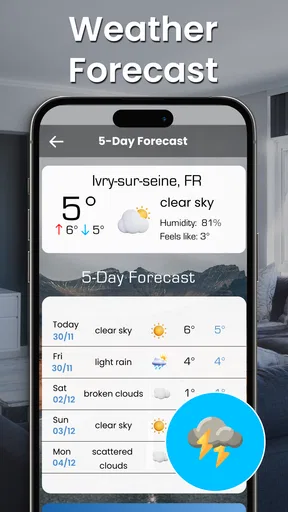
The Room Temperature Thermometer app primarily relies on your device's sensors, meaning it can function without an internet connection for basic temperature readings. However, an internet connection may be required for additional features such as weather forecasts, location-based services, and app updates.
Is the Room Temperature Thermometer app compatible with all devices?
The app is designed to work on both Android and iOS platforms. However, compatibility can vary depending on the device's age, operating system version, and hardware capabilities. It's advisable to check the app's requirements on the download page to ensure your device is supported before installation.
Does the app consume a lot of battery power?
The Room Temperature Thermometer app is optimized to minimize battery usage. However, like any app that utilizes sensors, it may consume more power if left running continuously. It’s recommended to close the app when not in use to conserve battery life, especially on older devices.
Are there any privacy concerns with using the app?
The Room Temperature Thermometer app may request access to certain device permissions, such as location services, to enhance its functionality. Rest assured, the app adheres to privacy guidelines, and any data collected is used solely to improve user experience. Always review the app’s privacy policy to understand data usage.
